Collection of Basic MySQL Commands for Creating Databases
Collection of Basic MySQL Commands for Creating Databases – This time, I’ll be discussing the fundamental commands used in database creation. Knowing these commands is essential for anyone starting with databases.

While SQL is an ANSI/ISO standard, there are various versions of the language. However, to comply with the ANSI (American National Standards Institute) standard, all versions support the main commands (like SELECT, UPDATE, DELETE, INSERT, WHERE) in a similar way.
RDBMS stands for Relational Database Management System. It is the foundation for SQL and all modern database systems like MS SQL Server, IBM DB2, Oracle, MySQL, and Microsoft Access.
Data in an RDBMS is stored in database objects called tables. A table is a collection of related data entries and consists of columns and rows.
Most database systems require a semicolon at the end of each SQL statement. The semicolon is the standard way to separate SQL statements, allowing more than one statement to be executed in the same call to the server. We will use semicolons in this tutorial.
Most Important SQL Commands:
- SELECT: Extracts data from a database
- UPDATE: Updates data in a database
- DELETE: Deletes data from a database
- INSERT INTO: Inserts new data into a database
- CREATE DATABASE: Creates a new database
- ALTER DATABASE: Modifies a database
- CREATE TABLE: Creates a new table
- ALTER TABLE: Modifies a table
- DROP TABLE: Deletes a table
- CREATE INDEX: Creates an index (search key)
- DROP INDEX: Deletes an index
SELECT Statement
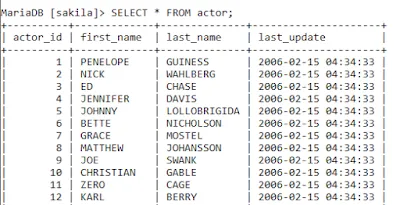
The SELECT statement is used to select data from a database.
SELECT *, column1, column2, ...
FROM table_name;
Example:
WHERE Clause
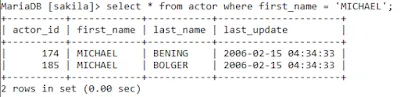
The WHERE clause is used to extract only those records that fulfill a specified condition.
SELECT column1, column2, ...
FROM table_name
WHERE condition;
Example:
ORDER BY Keyword
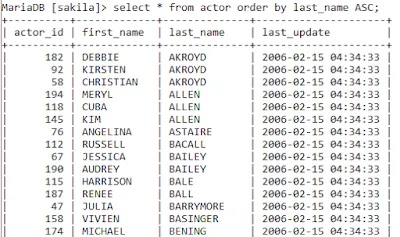
The ORDER BY keyword is used to sort the result-set in ascending or descending order. It sorts records in ascending order by default (ASC). To sort in descending order, use the DESC keyword.
SELECT column1, column2, ...
FROM table_name
ORDER BY column_name ASC/DESC;
Example:
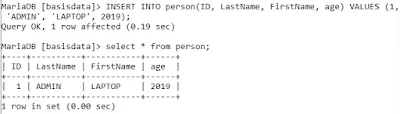
INSERT INTO Statement
The INSERT INTO statement is used to insert new records in a table.
INSERT INTO table_name (column1, column2, column3, ...)
VALUES (value1, value2, value3, ...);
Example:
UPDATE Statement
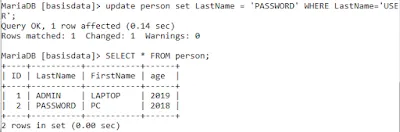
The UPDATE statement is used to modify existing records in a table.
UPDATE table_name
SET column1 = value1, column2 = value2, ...
WHERE condition;
Example:
DELETE Statement
The DELETE statement is used to delete existing records in a table.
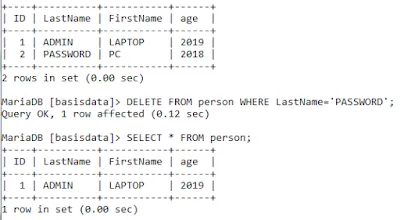
DELETE FROM table_name WHERE condition;Example: